
Aaaand now I’ve moved on from Tailscale to Netbird. The concept is similar, the implementation has a few differences though. Read about it here.
I have migrated from using OpenVPN to Tailscale. Tailscale uses a daemon to initiate an outbound connection with the Tailscale’s servers which act as the gateway, compared to OpenVPN where the server accepts inbound connections. The advantage of this is that it simplifies configuration massively, since you do not have to care about port forwarding, increased risks and the boneheaded details of the OpenVPN protocol, since Tailscale relies on Wireguard, a much better, lighter and faster protocol.
Tailscale subnet routing
Tailscale suggests that one uses their agent (daemon) on each machine you want to connect together, building a mesh network. I can see the benefits, but I am old fashioned. They do offer however subnet routing, in which case you can advertise complete network ranges, where the agent acts as a router. If it sounds similar to cloudflare’s tunneling, it’s because it is.
After installing tailscale, you can initialise it with the following command, in order to configure the agent as a subnet router:
tailscale up --advertise-routes=A.A.A.A/B,C.C.C.C/D...
You then have to go to the tailscale control panel and approve the machine and its routes. You can automate this process and secure it further with ACLs, but that’s beyond the point of this post. Still, configuring a subnet router is that simple and works, as long as you connect from another machine that has the agent installed. But what if we have two different networks we want them to talk to each other?
Not to forget: High-availability
Similar to cloudflared, you can achieve H.A. by running two instances of the tailscale agent with the same arguments. It is not that simple, but I’ll touch on that later.
Subnet-to-subnet routing
I have a small NAS at my parents’ home network, which I use for backups from my main systems, as the secondary remote location (I use an online service for the primary). While I could install a tailscale agent on the NAS itself and call it a day, I would also like to be able to have access to their network from my network including its devices. Here comes subnet-to-subnet communication.
In order to allow subnets to talk to each other, they must be configured to accept advertised routes from other subnet routers. To do that, you must first add to the tailscale up command the following argument:
tailscale up --accept-routes --advertise-routes=A.A.A.A/B,C.C.C.C/D...
Then, on your local network, you need to configure a static route in your network’s central router to direct traffic for the target network through where the tailscale agent lives. I have mine in a virtual machine, with IP 10.0.3.40, my parents’ network is 10.50.0.0/22, so in OpenWRT I have configured the following:
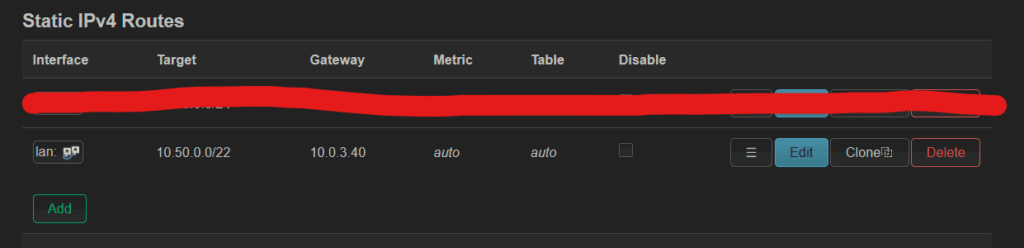
Similarly for the other side. You also need to configure MSS clamping as described here.
And everything works, right? No.
Tailscale High Availability breaks Subnet-to-Subnet routing
I have two virtual machines running tailscale on my home network, each running on a different host, for high availability. When I enable –accept-routes on both instances, one of them loses all connection to the local network. The problem is that –accept-routes cannot filter on which routes to accept, so it will also accept the ones running from the other instance, forcing LAN traffic to go through tailscale. How do we fix this?
Keepalived to the rescue, again
This is not a real solution, rather a work-around, but it works very well.
The short version is that I have configured keepalived to to bring the tailscale agent up or down, depending on whether it is currently the master node. If the master changes, the until-now backup instance becomes master and brings tailscale up, with the –accept-routes argument. When it goes down again, it will also bring the tailscale agent down.
Let’s configure our keepalived service on host A (the configuration file is /etc/keepalived/keepalived.conf):
global_defs {
   router_id tailscale-1
}


vrrp_instance V1_Tailscale {
        state MASTER
        interface eth0_or_other
        virtual_router_id 41
        priority 100
        advert_int 1
        unicast_src_ip 10.0.1.220
        unicast_peer {
                10.0.1.221
        }

        authentication {
                auth_type PASS
                auth_pass XXXXXXX
        }

        virtual_ipaddress {
                10.0.3.40/21
        }


        notify_backup /etc/keepalived/dists.sh
        notify_master /etc/keepalived/ents.sh
}
The file on the other instance is similar:
global_defs {
   router_id tailscale-2
}

vrrp_instance V1_Tailscale {
        state BACKUP
        interface enp6s18
        virtual_router_id 41
        priority 90
        advert_int 1
        unicast_src_ip 10.0.1.221
        unicast_peer {
                10.0.1.220
        }

        authentication {
                auth_type PASS
                auth_pass XXXXXXX
        }

        virtual_ipaddress {
                10.0.3.40/21
        }


        notify_backup /etc/keepalived/dists.sh
        notify_master /etc/keepalived/ents.sh
}
I won’t explain the details of keepalived here, you can refer to this post for more information. However, there are two lines on each file which are of significance:
notify_backup /etc/keepalived/dists.sh
notify_master /etc/keepalived/ents.sh
Here, notify_backup will execute the listed script when this keepalived instance enters the backup state and notify_master will do the same when the instance enters the master state. The contents of the file are simple:
- dists.sh executes tailscale down
- ents.sh executes tailscale up –accept-routes –advertise-routes=…
You may also have noticed the 10.0.3.40 IP address on the route configuration before. That’s the virtual IP for tailscale. This will effectively force only one tailscale agent instance in my network, effectively only having one local instance that does “–accept-routes” solving the problem. If the main instance goes down (e.g. the VM reboots), the secondary instance goes up.
Improvements?
As it is, the decision on which tailscale agent instance to run lies exclusively with the reachability of the current master from the backup node(s) on the network. You may want to have different criteria, such as a tracking script or a tracking interface. You may also want to handle the notify_fault script in such a case.
The above is still not an ideal solution, because it does not control for cases where e.g. the tailscale agent fails to start. It also offers no potential for load balancing. Still, it’s a solution that showcases (three times now in this blog) the power of keepalived, even without something like HAProxy (for HTTP traffic) or MetalLB (for any protocol).
Feel free to send me any questions at blog[at]vtable[dot]org. I had to disable comments here, since the amount of spam was unmanageable.