
Intro
This is going to be a two parter:
- Part 1 – This post, where I aggressively block failed connectivity attempts using fail2ban (with some crowdsec sprinkled in it). YOU ARE HERE.
- Part 2 – Where I install crowdsec on a reverse proxy running caddy.
I run my own mail server, something that is generally not recommended, because of the complexity that comes with ensuring security, compliance and “good behaviour,” to avoid having your server end up on spam lists or be vulnerable to attacks and taken over.
Not being one to back away from a challenge, I’ve went with docker-mailserver and have configured everything properly, including TLS, SPF, DMARC, DANE… the works. I’ve never really had a problem with my mail server, with one exception being Microsoft’s Hotmail recent shenanigans, that appear to have been fixed it by now.
However, on the mail server’s logs I see a lot of attempts to log on, and I mean a LOT. Some of them are using one my emails’ username. Others can be weird, where the username resembles a plus-addressing email I may have used here and there on some company, but without the plus part. I keep seeing them trying again and again to gain access without success. And this mildly infuriates me.
Fail2ban to the rescue
Of course, the default configuration of docker mailserver is to have fail2ban enabled. While it works well, these spam bots usually use multiple and adjacent addresses, allowing them to keep trying when you eventually block them.
My first attempt to mitigate this, was to go to the fail2ban-jail.cf and increase the bantime and findtime options to “10w” (two weeks) as well as changing the maxretry option to 1. If you fail to authenticate you are gone (for ten weeks). This works, but it’s not as effective as I’d have liked, because these botnets have a large pool of addresses to try from and while the volume of attacks was reduced, it was still higher than I would have liked.
How about… we block their whole /24 subnet?
Fair warning before you continue with my nonsense
Blocking a /24 is like swatting a fly with a sledgehammer. It may block you from receiving actual emails from legitimate sources and might even hurt your reputation in the different spam lists. Well, that’s the theory, but you are probably safe. Here’s why:
These bots usually use a cloud environment or another and they tend to allocate IPs dynamically. Since they have to use IPv4 to connect to my server (I’m not deploying IPv6 until Technitium gets it), you get a limited pool of addresses that you can allocate to a VM that needs to send mail, but they usually don’t use any OOB cloud services because they’d get an abuse report within seconds. That necessitates Public IP reallocation on these environments, be them dedicated Public IPs or NAT Gateways. And while they remain dedicated to the same customer while in use, the same IP can be later allocated to a different customer.
But…
- Legitimate companies usually have dedicated IPs for their mailservers,
- Other companies won’t try to authenticate to your mail server!
- Ideally, even if you try to log on to your mail server from a remote location, it’s highly unlikely that your client will use one of these ranges anyway.
Squashing malicious users with a /24 ban
Let’s create a configuration file for an action that will be used by fail2ban. Give it a name, e.g. nftables-subnet.conf, and make sure that it is properly mapped in your compose/manifest file so that it’s projected into this folder in the container: /etc/fail2ban/action.d/nftables-subnet.conf:ro (the :ro is optional, but it’s a good practice to ensure it is read only to the container).
The file should look like this:
[Definition]
actionstart = nft add table inet f2b-table
              nft add set inet f2b-table <addr_set> { type ipv4_addr\; flags interval\; }
              nft add chain inet f2b-table f2b-chain { type filter hook input priority -1\; }
              nft add rule inet f2b-table f2b-chain ip saddr @<addr_set> reject

actionban = nft add element inet f2b-table <addr_set> { <ip>/24 }
actionunban = nft delete element inet f2b-table <addr_set> { <ip>/24 }

[Init]
addr_set = f2b-set-subnet
So what does this do? If you are familiar with NFTables, it should be pretty self explanatory, but it essentially creates a table (think of it as a namespace) named f2b-table. It then adds a set (with the flags interval part that allows operating on IP ranges) named f2b-set-subnet which is essentially a list that will contain the banned IPs. The chain is a collection of rules that will reject a packet if an IP is found in the aforementioned set of IP ranges.
We then have two actions that are invoked by fail2ban. When an offending IP needs to be added, the whole /24 range is added instead. When the ban duration expires, the range is removed from the set.
Let’s go back to the fail2ban-jail.cf. To use the action, modify these sections (I’ve removed the irrelevant parts here:
[DEFAULT]
banaction = nftables-subnet

[dovecot]
banaction = nftables-subnet

[postfix]
banaction = nftables-subnet
Does it work? Oh boy, does it ever. Here’s it running for quite a few days now.
$ nft list sets
table inet f2b-table {
        set f2b-set-subnet {
                type ipv4_addr
                flags interval
                elements = { 5.199.217.0/24, 14.23.77.0/24,
                             20.120.106.0/24, 31.179.228.0/24,
                             34.141.71.0/24, 34.165.225.0/24,
                             34.175.203.0/24, 36.159.139.0/24,
                             37.203.49.0/24, 38.35.225.0/24,
                             41.79.19.0/24, 41.139.11.0/24,
                             41.191.220.0/24, 43.203.215.0/24,
                             45.118.32.0/24, 45.168.56.0/24,
                             47.206.63.0/24, 51.103.25.0/24,
                             60.173.105.0/24, 60.223.248.0/24,
                             64.64.99.0/24, 65.20.205.0/24,
                             69.79.101.0/24, 80.94.95.0/24,
                             84.189.88.0/24, 102.53.15.0/24,
<about three more pages of IPs that were snipped>
                             183.108.233.0/24, 183.167.193.0/24,
                             183.182.99.0/24, 185.93.89.0/24,
                             185.255.215.0/24, 186.124.218.0/24,
                             186.200.6.0/24, 187.8.120.0/24,
                             187.120.96.0/24, 187.237.47.0/24,
                             188.166.179.0/24, 190.89.136.0/24,
                             191.96.36.0/24, 196.0.107.0/24,
                             201.28.237.0/24, 201.63.138.0/24,
                             213.92.222.0/24, 218.27.205.0/24,
                             222.186.68.0/24 }
Some of these IPs look legitimate. Microsoft, GCP, Cloudflare. Don’t be fooled; legitimate businesses do NOT attempt to log on to your account unless you’ve explicitly asked them to (e.g. aggregating your emails to your Google account).
Should I crowdsec them?
You can, but it might not make much sense. Crowdsec will probably not react at all to a single offence and with the above setup they don’t get a second chance.
But I insist. How can I do that?
This can still be useful for additional correlation purposes or if you ever decide to loosen up fail2ban’s restrictions on the mail server. What is important, is that you cannot (and you should not) attempt to send the whole ranges to crowdsec but rather just the individual IPs. I take the logs from the mail server and stream them to my crowdsec VM using rsyslog. My configuration looks like this:
template(name="RawOnly" type="string" string="%rawmsg:1:$%\n")

ruleset(name="forward-mail") {
    if ($msg contains 'rip=' or $msg contains '[') then {
            action(type="omfwd"
                   target="crowdsec VM IP"
                   port="6050"
                   protocol="tcp"
                   action.resumeRetryCount="-1"
                   action.resumeInterval="5"

                   queue.type="LinkedList"
                   queue.size="200000"
                   queue.dequeueBatchSize="1000"
                   queue.workerThreads="2"
                   queue.timeoutEnqueue="0"
                   template="RawOnly")
            stop
    }
}

input(
    type="imfile"
    File="/<dockermailserver logs location>/mail.log"
    Tag="mailserver"
    Ruleset="forward-mail"
)
I ended up with this configuration with the help of an LLM because not only rsyslog can be quirky and losing its marbles when log files rotate, but also due to the way the data is transmitted: I had to filter the first 1 byte from each log line, stream it only if the line contains a “rip” or “[” sting (indicating an IP, otherwise it’s useless to crowdsec) and also using a queue, to avoid the connection dying over time (ask me how I know).
On the machine running crowdsec, the configuration for rsyslog has the following entry:
if $rawmsg contains_i 'postfix' or $rawmsg contains_i 'dovecot' then {
    action(type="omfile" file="/var/log/mailserver.log")
    stop
}
This writes the sanitised log entries to that machine’s var/log directory. Keep in mind that rsyslog can be finicky with log rotation, which was an issue (we don’t want the mailserver logs to fill up the disk space now, do we?) so you will probably need to configure logrotate by creating a file under /etc/logrotate.d/, e.g. /etc/logrotate.d/mailserver. Here is mine:
/var/log/mailserver.log {
    daily
    rotate 14
    compress
    missingok
    notifempty
    create 640 root adm
    sharedscripts
    copytruncate
    postrotate
        /usr/bin/systemctl kill -s HUP rsyslog.service >/dev/null 2>&1 || true
    endscript
}
Without the above configuration, when the log file rotates, rsyslog stops streaming. There are probably better options out there, but this one works for me. Under /etc/crowdsec/acquis.d we add a file named e.g. mailserver.yaml with the following contents:
filenames:
  - /var/log/mailserver.log
labels:
  type: syslog
This instructs crowdsec to use the log file as a source. I have omitted configuring crowdsec to parse postfix and dovecot logs, but that shouldn’t be too hard to get going. Let’s see if it works, shall we? Run the following command:
sudo cscli explain -t syslog -f /var/log/mailserver.logThe result should look like this:
line: 2026-04-15T12:36:35.492337+02:00 mail dovecot: imap-login: Login: user=<mailaddress>, method=PLAIN, rip=realip, lip=containerip, mpid=72268, TLS, session=<nARASn1PgL0KPAEK>
        ├ s00-raw
        |       └ 🟢 crowdsecurity/syslog-logs (+12 ~9)
        ├ s01-parse
        |       ├ 🔴 crowdsecurity/apache2-logs
        |       ├ 🔴 crowdsecurity/caddy-logs
        |       └ 🟢 crowdsecurity/dovecot-logs (+7 ~1)
        ├ s02-enrich
        |       ├ 🟢 local/custom-whitelists (~2 [whitelisted])
        |       ├ 🟢 crowdsecurity/dateparse-enrich (+2 ~2)
        |       ├ 🔴 crowdsecurity/geoip-enrich
        |       ├ 🔴 crowdsecurity/http-logs
        |       ├ 🟢 crowdsecurity/public-dns-allowlist (unchanged)
        |       ├ 🟢 crowdsecurity/whitelists (unchanged)
        |       └ 🟢 my/cloudflare-as-whitelist (unchanged)
        └-------- parser success, ignored by whitelist (private ipv4/ipv6 ip/ranges) 🟢
So it works. The IP is whitelisted, since this comes from within my network. If there were a problem here, you would have seen an error message. Here’s another example:
line: 2026-04-15T12:38:26.814693+02:00 mail dovecot: pop3-login: Login failed: Plaintext authentication disabled: user=<>, rip=206.189.39.63, lip=containerip, session=<udniUH1P1qTOvSc/>
        ├ s00-raw
        |       └ 🟢 crowdsecurity/syslog-logs (+12 ~9)
        ├ s01-parse
        |       ├ 🔴 crowdsecurity/apache2-logs
        |       ├ 🔴 crowdsecurity/caddy-logs
        |       ├ 🟢 crowdsecurity/dovecot-logs (+7 ~1)
        |       ├ 🔴 crowdsecurity/iptables-logs
        |       ├ 🔴 crowdsecurity/nginx-logs
        |       ├ 🔴 crowdsecurity/postfix-logs
        |       ├ 🔴 crowdsecurity/postscreen-logs
        |       ├ 🔴 crowdsecurity/sshd-logs
        |       └ 🔴 crowdsecurity/sshd-success-logs
        ├ s02-enrich
        |       ├ 🟢 local/custom-whitelists (unchanged)
        |       ├ 🟢 crowdsecurity/dateparse-enrich (+2 ~2)
        |       ├ 🟢 crowdsecurity/geoip-enrich (+13)
        |       ├ 🔴 crowdsecurity/http-logs
        |       ├ 🟢 crowdsecurity/public-dns-allowlist (unchanged)
        |       ├ 🟢 crowdsecurity/whitelists (unchanged)
        |       └ 🟢 my/cloudflare-as-whitelist (unchanged)
        ├-------- parser success 🟢
        ├ Scenarios
So this IP, 206.189.39.63, tried to log on to my mail server to read my emails. It failed (miserably) because it didn’t even attempt a secure connection. I wonder if my mail server’s fail2ban has blocked it:
$ nft list sets | grep 206.189.39
                             201.63.138.0/24, 206.189.39.0/24,
Yes it has! But did crowdsec also block it? No, but that’s because it didn’t have a chance to reach the necessary thresholds. Because of how aggressive the mail server’s banning strategy is, it will probably never be filtered properly which may seem to defeat the purpose of sending these IPs to crowdsec in the first place (again, unless you loosen fail2ban’s restrictions). However, this builds a reputation score for this IP which will be shared with other crowdsec users, eventually leading up to a ban for the whole user base. We can have a look at crowdsec’s IP search page:
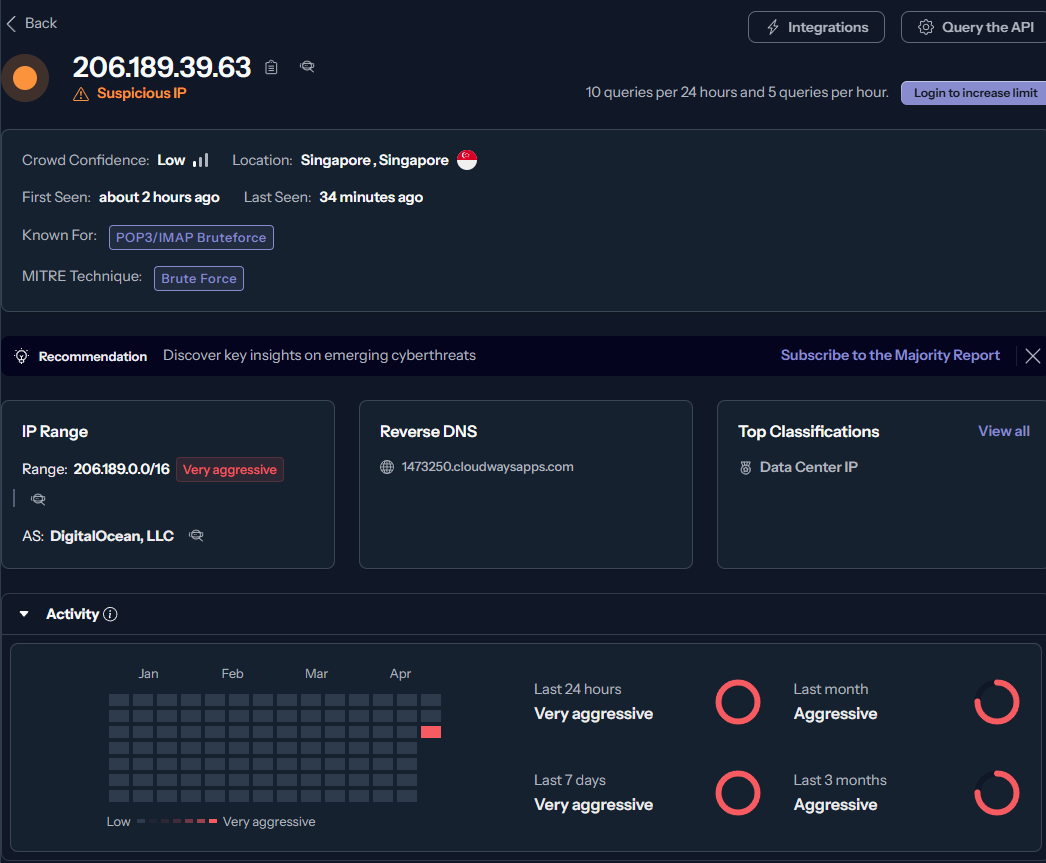
This IP was allocated 2 hours ago! I’m sure that in a few hours it will be added to one of the blocklists.
Feel free to send me any questions at blog[at]vtable[dot]org. I had to disable comments here, since the amount of spam was unmanageable.