
The Problem of High Availability with Tailscale
I have been a very happy user of Tailscale for about a year now. I tried a direct Wireguard VPN a while ago, in an attempt to get away from the dysfunctional OpenVPN solution I had, but I did face certain bugs with it and it failed to land. That’s probably a case of PEBKAC, however it was around that time a friend introduced me to Tailscale. And it was magical.
Perhaps … a bit too magical. You see, Tailscale’s mission is to make mesh-based VPNs accessible to everyone. That means doing away with or hiding certain quirks of Wireguard, making sure that the end result just works. And it does. It’s very easy to get up and running with Tailscale, which is a far cry from my experience with Wireguard, and a whole different world from the clunky setup of OpenVPN. Admittedly, some of this magic becomes a bit of a roadblock when you try to do something more advanced, but for the most part, it just works.
You may know by know what keeps me up at night. High Availability. I try to have critical systems of my infrastructure as highly available as possible. When that becomes impractical or even impossible, I try to have some form of a reasonable failover. One example is my small databases that I run on Kubernetes: I generally have low activity workloads in my homelab, so the general advice of not running databases in Kubernetes doesn’t apply to me. Problem is that e.g. MariaDB would never cooperate properly if a Kubernetes node were to suddenly go offline, be it using a Galera cluster or simple replication. As such, I would rather run one instance of it, and if that node were to go down, I’d suffer a minute or two of downtime until it restarts on a new node.
I tried to implement a similar model with Tailscale, because of one significant limitation. If you have a subnet router that advertises routes and also accept routes, you can’t have more than one of them for the same network be active at the same time, period. I tried to use keepalived to handle this and while it generally works, there are edge cases where keepalived won’t catch that the instance has become unavailable and won’t switch. And of course, this happens when I am remote and I need to access my network. By switching to Ceph for my VMs I can at least guarantee that spinning up the Tailscale VM on another host would be guaranteed to start on another node if the running node would go down, unlike with the standard Replication model of Proxmox. Even that wouldn’t offer true HA however (e.g. assuming there is a problem with that VM, rather than the node), and it also would not allow me to reliably have a dedicated Raspberry Pi running Tailscale to be involved into a HA model.
What is Netbird?
Netbird is an offering similar to Taiscale, aiming to make Wireguard-based P2P and traditional VPN networking more accessible to users and business. It is friendly to homelabbers with a generous free option, but it also does things a bit differently than Tailscale (comparing the two free tiers):
- Whereas Tailscale uses Access Control Lists to handle permissions, Netbird uses a combination of policies, user groups and Network Routes. Generally speaking, ACLs are more powerful than Netbird’s approach, however you can approximate the two well enough.
- Netbird’s whole stack is Open Source. You can migrate to an on-premises installation without a hitch, whereas with Tailscale, you’d have to use a 3rd party component for the coordination server (Headscale).
- Netbird has network segmentation more ingrained in its solution. It allows you to segment networking visibility much more cleanly, whereas where visibility is concerned, Tailscale has a single flat tailnet (although ACLs can simulate segmentation).
- Speaking for the cloud-based solutions, Netbird is a bit more generous with its free plan, in terms of number of users and devices.
- Performance in generally higher with Netbird. While you get similar performance if you can use Wireguard Direct (i.e. open a UDP port to the peer), Netbird’s TURN protocol usage will peform better than Tailscale’s DERP, while also giving you the ability to host relay servers closer to home.
- And the most important thing in the list, High Availability. Whereas Tailscale suffers from the aforementioned woes, Netbird allows you to have “peer groups” for routing peers (subnet routers in Tailscale nomenclature) both active at the same time, without suffering from sudden LAN unreachability or asymmetric routing.
It seems to me that if your needs are a slightly bit advanced, mostly having to do with subnet routing and high availability, Netbird is generally the better choice.
Netbird Basics
I generally don’t bother with P2P configuration, unless it’s a mobile client device (my phone and my laptop). I do prefer to configure P2S & S2S access, which while not very ZTNA, is good enough for my network.
In Tailscale, you have a list of peers. In each peer, you configure it via CLI to 1) accept remote subnet routes, 2) advertise its own, 3) additional configuration (e.g. to ignore pushed DNS). You then do your networking micro-segmentation using Access Control Lists, which is a JSON file where you define a source (can be a tag, a user, or a network) and the target (similar). This works well for a limited amount of policies, but can get a bit out of hand after a point.
Netbird does not use Access Control Lists. Instead, it has the following components:
Access Groups
Access Groups are traditional groups you’d find in most systems, to which you can assign users and peers. They are used with other constructs to simplify access, e.g. instead of configuring each user and/or peer one by one. I generally have a group for my mobile devices, and one per site (with a small exception, detailed below).
Networks
Networks are the new kid on the block, where you define a… Network, which contains a number of resources. A Resource is an IP range. Networks were implemented to simplify configuration compared to Network Routes listed below, but they are not yet feature complete (e.g. currently there is no support for S2S configurations) and as such I haven’t used them here and won’t expand further on it.
Network Routes
Network Routes are the original network configuration entity. A Network Route defines an IP range that is available for accessing. You then select which peers can route to this range, and this is the significant difference. You can select a single peer, or you can select a Group of Peers (more on this later). Netbird handles HA natively.
What confused me to high heavens here is what Netbird calls Distribution Groups & Access Control Groups. To save you time, I am going to list what each of those is:
A Distribution Group: This is a group (users, peers, whatever), to which this route is advertised and is known to it. If you don’t put a group here, then it won’t be able to see the Network route.
An Access Control Group: The way I understand this, is that this group is the one that exposes the Network route. Caveat emptor: There might be more advanced scenarios possible here, but for my use case, the routing peers that would normally expose this route, are the ones part in the Access Control Group of the Network route.
Access Policies
Generally speaking, an Access Policy is the glue between Network Routes and Groups. In the source of the policy you define a Group or Peer, and at the Target you define what Group or Peer (or Resource, if you use Networks) it has access to. You can filter it down further by defining a protocol and a port range, and also specify if this policy is bidirectional. With a paid plan, you can also define device posture checks, which for the most part you don’t really need in a homelab setting.
I generally define one unidirectional policy per connection.
Putting all together
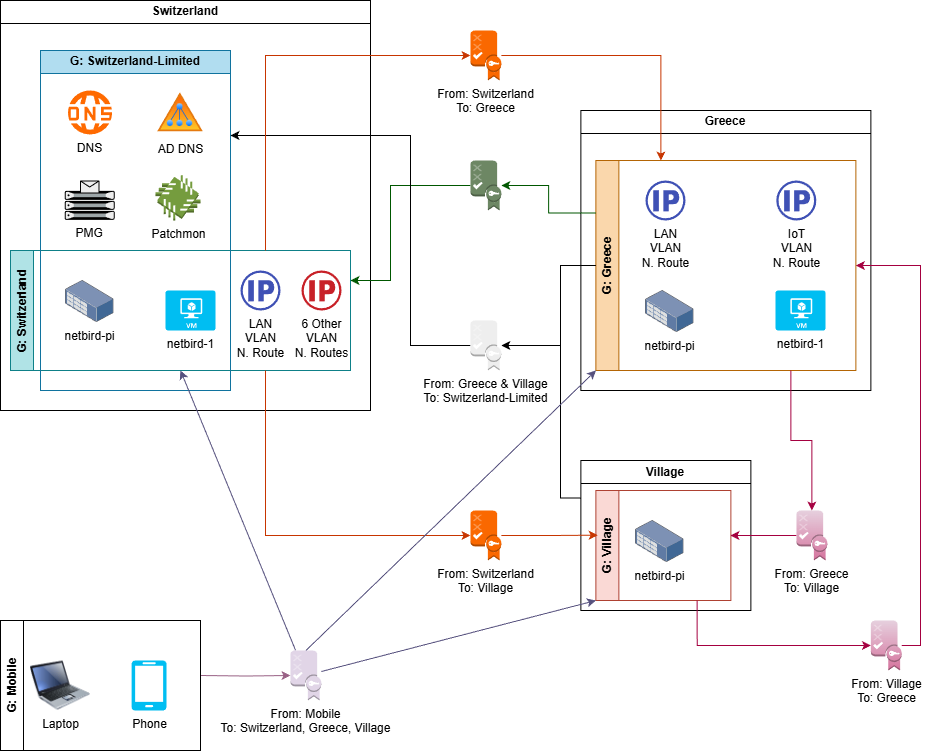
My skills with diagrams are not the best out there. We’re doing them anyway. In the above diagram, I have 3 sites:
- Switzerland,
- Greece,
- Village (in Greece).
I have defined 5 Access Groups:
- Switzerland, which covers every one of the seven VLAN in my home network. I don’t have a problem, I can stop adding VLANs whenever I want!
- Switzerland Limited, which only allows access to DNS (I run Technitium clusters at both Switzerland and Greece), Proxmox Mail Gateway for notifications, Patchmon Server for patching notifications, and the Active Directory DNS (used for syncing the secondary zone in the Technitiums).
- Greece, which covers the two VLANs there,
- Village, which is a small Raspberry Pi with a 4G router, that allows me to keep an eye on the cameras and other sensors on my village home.
- Finally, group Mobile, which covers roaming devices, such as my phone and laptop.
It then comes all down to policies. In the policies listed above, I want to define the following flows:
- Allow all traffic from Mobile to everything. Pretty self-explanatory.
- Allow all traffic from Switzerland to Greece and Village, but not Mobile, because there’s going to be no need to connect to my phone or laptop remotely.
- Allow Village and Greece to communicate with each other. I don’t actually have a use case where this is needed at the moment.
- Allow Greece to communicate with critical services that must be always available, such as DNS.
- Allow Greece to communicate with all Switzerland IPs when needed. I use this as a toggle. I generally don’t want to allow unconditional access to my home network, unless I’m visiting and I do it for convenience. Even then, I could simply use my laptop’s Mobile group that always connects and just make sure that the Netbird agent runs.
Note that policies are additive. If you have overlapping policies that both apply, you will get the union operation of both.
Additional Settings
One additional setting I configure is DNS. The Mobile and Village groups do not have a DNS server on-ste, so in order to allow resolution of internal domains (e.g. something.i.vtable.org) there, I have defined the VRRP IPs of my two DNS servers (one in Switzerland, the other in Greece) in the DNS section, and have chosen Mobile and Village as the Distribution Groups, and have also defined the internal domain names (e.g. i.vtable.org).
Final Impressions
I am very happy with Netbird. Before I finished configuring everything, there were a lot of pain and tears, trying to grasp the concepts Netbird exposes. I also lost quite a bit of time with Networks, before realising that they are not ready for S2S connections.
I haven’t performed any extensive benchmarks, but I did copy some large files over both Tailscale and Netbird. The source and target systems are fast enough, both have NVMes, there’s a 1Gbit/500Mbps connection in Greece and a 25/25Gbit in Switzerland. With Tailscale I could barely manage 4-5MB/s whereas Netbird averages about 25-35MB/s, both over relayed connections.
I also noticed that internal websites open at least as snappy as before, and I haven’t noticed any input latency in the ssh console of remote systems, and also please keep in mind, this is over a relayed connection, because I haven’t bothered to open any ports yet.
But… HA is magical! I shut down one of the nodes locally. I momentarily lost connection to a remote machine via SSH. Reconnected and it was as if nothing happened. You cannot begin to understand how happy this makes me on a deep, deep level of IT bliss.
Feel free to send me any questions at blog[at]vtable[dot]org. I had to disable comments here, since the amount of spam was unmanageable.