
How it started
On this post I had posted the following diagram (click to see it in its full size):

This showcased how I used two instances of Pi-hole and two OpenWRT routers to achieve high availability. The setup was pretty much as following:
- OpenWRT handled DHCP & first-contact DNS duties,
- They would do conditional forwarding to the Domain Controller for the internal domain, or to the Pi-holes for everything else,
- The Domain Controller would then forward any queries arriving to it to the Pi-Holes
- The Pi-Holes would decide if a query would be filtered based on their blocklists, or then be forwarded to Cloudflare’s DNS.
- The routers would forward any DNS queries coming from the Pi-Holes or the DC only; all other DNS requests coming from any other machine would be blocked, just so I could tame Android & some Microsoft shenanigans.
The beauty of the setup is that all parts were highly available, minus the DC because I don’t really need a replica at home; Proxmox is pretty damn good with its HA capabilities and since I barely touch it, offline replication or restoring from backups is always the better option.
What happened
My setup had a few issues.
First, since OpenWRT was at the centre of everything, all logs in the Pi-Holes would show the routers as the source. Since I wanted to do the aforementioned conditional forwarding but also have the ability to filter any requests coming from the DC (which today’s me doesn’t think is that critical), the conditional forwarding part had to happen before both, aka the routers.
I also had to setup two rules per VLan (and respective zones in OpenWRT), one for access to the router’s DNS and another for forwarding to the Pis which while is a bit of a nit-pick, it was still ugly.
But my worst problem yet is that ever since I upgraded to Pi-Hole v6, the main instance (running as LXC in Proxmox) would die and had to be manually rebooted. Keepalived wouldn’t help, since technically the service was still running, and a query would have to exhaust the DNS timeout before trying the secondary one. To clarify, I set up 3 DNS servers:
- The keepalived IP
- The primary DNS IP
- The secondary DNS IP
The above is a bit of overkill, but the idea is that if keepalived stops working for any reason, the actual DNS addresses would still be accessible. Yes, I am well aware that multiple DNS servers are a thing, so keepalived is not really necessary. I did not manage to find a solution for the primary Pi-Hole dying, whereas the one running on the Raspberry Pi would always chug along.
Then I came across Technitium by accident.
What is Technitium?
I can only guess that the name somehow relates to Technetium, a radioactive chemical element. But Technitium refers to a suite of (open source) products, the most well known of which is the Technitium DNS Server.
Put it simply, Technitium is a DNS Server that supports a staggering amount of protocols (DoH, DoT, DoQ, DNSSEC and more), supports encryption, supports different zones with multiple zone types, offers DHCP services, has its own cache, supports blocklists, and can even extend its functionality with “apps”. It is essentially a Pi-Hole on steroids with a much richer feature-set than most DNS services out there (including dnsmasq, unbound, bind).
What is great about it?
The great part is that I get to consolidate DNS, DHCP and Ad-blocking into one place. The DC can use Technitium as its forwarder, so I don’t need to complicate the setup as with my first iteration.
The routers now don’t run the DNS & DHCP service. Almost all of my devices rely on DHCP with static leases, which means that Technitium’s DHCP will respond with a lease offer to those machines, as it will do for others that have no static leases. Statically configured machines (such as the Kubernetes ones) simply point to Technitium’s keepalived address (plus the other two) as their DNS.
I haven’t looked into any of the advanced features yet, such as DoH/T/Q but you don’t have to. In most cases, companies tend to rely on DoH to bypass DNS restrictions for ad blocking, which in turn makes me to pre-emptively block as many of them as possible. However, DoH would allow you to have Technitium publicly visible but with basic authentication, allowing you to extend adblocking when on the go, without the need for a VPN or an application… if only Android did support Basic Auth.
Oh, it also supports DNSSEC, in case you care about this thing in your internal network, or you want to expose the server to the public Internet.
What is not great though?
Analytics are not as polished and clear as with Pi-Hole. You also have to install some form of a database to be able to query the logs. The analytics seem to be containing too much information at times, but that’s understandable since the main focus of Technitium is antithetical to that of Pi-Hole; a comprehensive DNS server first with adblocking features, versus adblocking first with some DNS features second.
Certain features will require you to dig through menus (e.g. to temporarily disable blocking) and navigation (on a light-only theme no less) does not work with the back button. These are things you get used to easily, but it shows that Pi-Hole had the opportunity to be quite mature.
Documentation is a bit lacking. The developer is very responsive and you can find threads on Reddit with common questions, but seems to be only one person. Of course, with the project being open source, there’re already over 500 forks, you can rest assured that if the original developer would decide to abandon the project, it would still continue (albeit with a bit of chaos).
OK, but how do I make it highly available?
I started writing this before v14 was released, which it happened a week or so ago. Version 14 is significant because it includes an initial implementation of clustering (for DNS only).
What does a Technitium cluster support?
When you create a cluster, one node becomes the primary and the others are secondary. Then, any DNS primary zones you create are linked with a “cluster catalogue” which is a way of saying that these zones should be replicated to nodes across the cluster.
Secondary nodes have those zones created as secondary ones and they keep in sync with the primary. In case of a failover, the secondaries still serve DNS queries.
What’s not there yet?
No automatic promotion to primary
Due to the design, in case of a failover the secondaries remain secondary. That means that until the primary is back up, you won’t be able to make any modifications to the zone, necessitating backups in case something goes very bad.
No DHCP sync
DHCP is not (yet) part of the clustering process, which creates two interesting problems. The first is simple, you need to configure your DHCP scopes and settings across the nodes.
There is a solution for that. You can in theory use the API to synchronise the DHCP scopes across the cluster and there are scripts written by people to automate this. I haven’t tested those yet but they should work or I may write my own.
Automated DNS entries from DHCP do not work well with the cluster
This had me stumped for a while. Consider the following option found under a DHCP scope’s configuration:
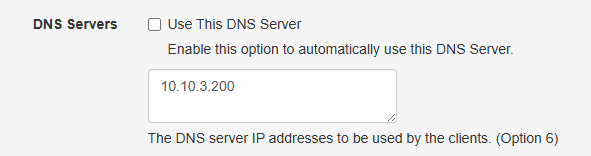
If you enable the “Use This DNS Server” option, DHCP assignments from the primary will also create DNS entries in the relevant zone. However, if the scope is configured on a secondary node, this will fail, since secondary nodes only have secondary zones from the cluster and those cannot be updated.
You have two options here:
Use the primary’s DNS only: In this case, on the primary node you can safely enable this option and on the secondaries you will specify the IP address of the primary. You can also configure a delay on the DHCP response on the secondaries, to give the chance to the primary to assign the IP address and the DNS entry.
What happens if the primary is gone? DHCP should still work, but you won’t be able to update the DNS entry.
The problem is, if a lease is assigned by a secondary server but your primary is down… the lease will never be assigned on the DNS. And then the primary can never pick up the lease again, because the secondary thinks it has already allocated it.
The bottom line
I really like Technitium! I like the ability to configure separate subdomains (one per VLan) and be able to manage and replicate multiple zones without feeling restricted, like I was with OpenWRT & Pihole. It retains pretty much all the advantages of PiHole, even if the UI is not as polished. It has features that I probably will never use (like DoH to which I am ideologically opposed) but despite its immense features, it never feels complicated to use. The developer seems poised to keep maintaining it and the DHCP support for clustering in the next release is very promising. I’ve donated to the project already and it’s well worth it.